

Picking a run up
Carry a loop on from where its last run stopped, instead of starting it over. Use this after ctrl+c, after a budget ran out before the work was done, or after the machine went down mid-run. By the end of this page you will have stopped a loop, picked it up both at the prompt and from a script, and checked that its conversation went on where it left off.
Try it
/resumehmz exec -f stateful_ralph -a agent=claude/claude-opus-5:high -p budget.duration=2h \
--resume "$(cat TASK.md)"At the prompt, /resume first says which run it carries on, then the flow starts again:
resuming 20260930T053826.667Z-55bb87: running stateful_ralph from saved stateBefore you start
- A flow that can be picked up. Most of the official loops can,
stateful_ralphandrlaramong them; each flow's page says whether it can.chatcannot, and neither canralph_loop, which keeps nothing but the repository: running it again is carrying it on. - An earlier run of that flow, in this directory, that got far enough to save something. Runs are kept per directory, so start
hmzorhmz execwhere the first run started. - Nothing running here now. Stop a running flow first.
What picking up means
A flow that can be picked up keeps a small record of where its loop has got to, such as whose turn is next, the last review, or the session it works in, and saves it every time it changes. A run that stops for any reason — ctrl+c, a spent budget, a crash, a machine switched off — leaves that record behind. Picking the run up starts the flow again with that record, so the loop carries on from there instead of starting from nothing.
Three things are worth knowing before you rely on it:
- It is a new run. The run that stopped is never reopened. The one that carries it on is a run of its own, with its own sessions, its own trace and its own row in
/epics. A week of stops and starts reads as one run per stretch. Achatis the one exception: it is one conversation, so saying something in one that has ended carries it on in its own epic, its agent remembering what was said. - The agents' conversations carry over only where the flow kept them. What carries over is what the flow chose to keep, and the files the agents already changed in your project. A flow that kept a session in its record, as
stateful_ralphdoes, has that conversation carried on from where it was kept; every other turn opens a fresh one. - Budgets do not carry over. What the earlier run spent is not counted against the new one.
There are three ways in:
| Way in | Picks up | Runs it with |
|---|---|---|
/resume at the prompt | the last run here of a flow that can be picked up | that run's own agents, environments, params, budget and task |
/epics, then resume epic | any run you choose | the same: that run's own setup |
hmz exec --resume | the newest run of the -f flow here that saved something | the line's own -a, -e and -p, budget included |
A run whose environments were written down as local@/srv/x, docker@local/srv/x, swarm@local/srv/x, apple-container@local/srv/x, slurm@local/srv/x or an ssh host nobody saved out of brackets is picked up on the same places, spelled as -e takes them: local/srv/x, docker/srv/x, swarm/srv/x, apple-container/srv/x, slurm/srv/x, ssh@[host]/… -- the @local ones only while no runtime of theirs is saved as local, and an ssh host only while none is saved by its name.
Example: stop a loop on its budget, then carry it on
A tiny project with two failing tests, and stateful_ralph, which sends the task again every round in one session, and keeps that session in its record after every round. The budget is deliberately small so the run stops by itself.
hmz exec -f stateful_ralph \
    -a agent=claude/claude-haiku-4-5-20251001:low \
    -p budget.output_tokens=1500 \
    "$(cat TASK.md)"
The run, as it appeared at the terminal (the agents' thinking trimmed):
● agent is working                                                     ①
● Read(…/app2/test_slug.py)
● Read(…/app2/slug.py)
● Edit(…/app2/slug.py)
● Bash(cd …/app2 && python -m pytest test_slug.py -v)
● Done! Both tests now pass. …
✻ input 50 · output 1.0k · cache_read 127.5k · cache_write 1.8k · $0.02 · claude-haiku-4-5-20251001 · agent
✻ Worked for 14s · agent
● agent is working
● Bash(cd …/app2 && python -m pytest test_slug.py -v)
● Both tests still pass; slug.py needs no further change. …
✻ input 26 · output 810 · cache_read 62.8k · cache_write 1.2k · $0.01 · claude-haiku-4-5-20251001 · agent
✻ Worked for 11s · agent
hmz exec: stopped -- stateful_ralph:stateful_ralph: its budget's output tokens are spent   ②
echo $? prints 0. Now run the same line again with --resume and a fresh budget:
hmz exec -f stateful_ralph \
    -a agent=claude/claude-haiku-4-5-20251001:low \
    -p budget.output_tokens=800 \
--resume "$(cat TASK.md)" # ③● agent is working ④
● Bash(cd …/app2 && python -m pytest test_slug.py -v)
● As in the last two rounds, both tests pass and slug.py is done. …
✻ input 34 · output 1.0k · cache_read 84.2k · cache_write 1.5k · $0.02 · claude-haiku-4-5-20251001 · agent
✻ Worked for 13s · agent
hmz exec: stopped -- stateful_ralph:stateful_ralph: its budget's output tokens are spentWhat each part means
● agent is workingopens each round: the task again, in the same session.stateful_ralphprints nothing of its own. After each round it saves the session in its record, which keeps the conversation as it stands then.hmz exec: stopped -- …names the limit that was reached, on stderr. The budget was found spent as the third round was to start, before the agent began working. A budget stopping a loop is the ordinary way for a loop to end, so the exit status is still0.--resumeasks for the newest run ofstateful_ralphin this directory that saved something. The rest of the line is read as usual: the-aand-phere are what the carried-on run uses, so this is where you change the model or give it more room.- The agent remembers. The first round of the new run carries on the conversation the flow kept after round 2, so the agent knows what the earlier rounds did. The files it fixed in round 1 are still in your project too.
Example: pick it up at the prompt
Open hmz in the same directory and type /resume. The command is offered in the / list only while there is a run here to carry on and nothing is running:
❯ /resume
resuming 20260930T053826.667Z-55bb87: running stateful_ralph from saved state  ①
── agent
● agent is working
                                          agent · claude/claude-haiku-4-5-20251001:low · ● 1   ②
resuming <run>: running <flow> from saved statenames the run being carried on, by the name/epicslists it under, and the flow it runs.- The agent line shows the agent that run was set up with, here Claude Haiku at
low, even though the prompt itself is set up for another flow./resumeruns what ran: the flow, its agents, environments, params, budget and task all come from the run. The budget is counted from zero again.
To carry on an older run than the last, open /epics. Runs you can pick up end with resumable:
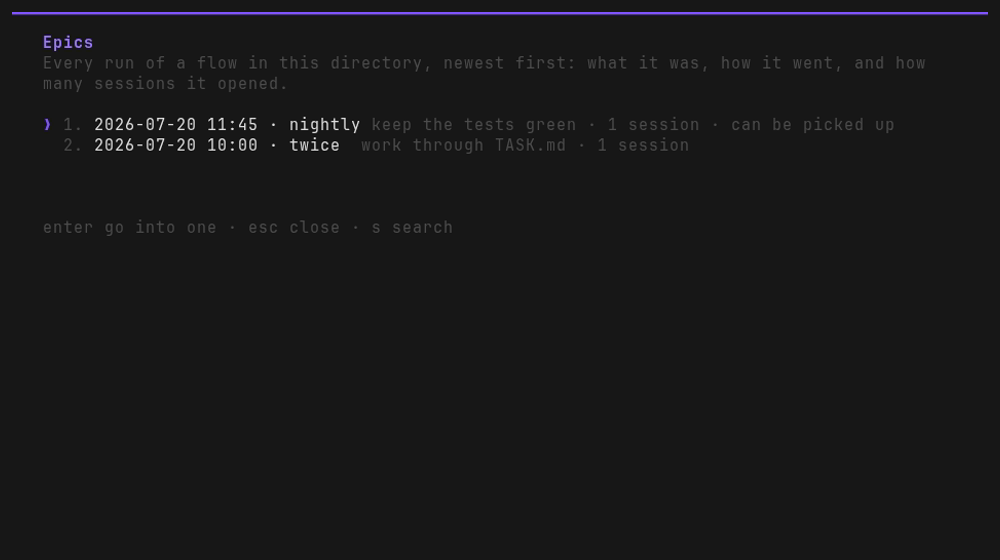
Press enter on one and choose resume epic:
  hmz › /epics › 2026-09-30 05:38 · stateful_ralph
  …/epics/-tmp-hmzdocs-C-app/20260930T053826.667Z-55bb87
  It stopped with 1 agent in 1 session.

  ╭──────────────────────────────────────────────────────────────────────────╮
  │ resume epic               resume the flow from this epic                 │
  │ export epic               the entire epic as an archive, with its trace  │
  ╰──────────────────────────────────────────────────────────────────────────╯

  enter choose   esc back
The resume epic row is there only when the flow, as it is today, can be picked up. When it cannot, the line under the list says <flow> is not resumable, so this epic cannot be resumed. esc, ← or a click on /epics across the top goes back to the runs.
Check that it worked
The conversation went on. The first answer after
--resumeor/resumeknows what the rounds before the stop did, as in ④ above.A new row in
/epics. The carried-on run is listed above the one it came from, with its own session count:text╭──────────────────────────────────────────────────────────────────────────╮ │ 2026-09-30 05:40 · stateful_ralph Make the tests in test_slug.py pass. │ │ Change slug.py only. · 1 session · │ │ stopped · resumable │ │ 2026-09-30 05:38 · stateful_ralph Make the tests in test_slug.py pass. │ │ Change slug.py only. · 1 session · │ │ stopped · resumable │ │ 2026-09-30 05:37 · stateful_ralph Make the tests in test_slug.py pass. │ │ Change slug.py only. · 1 session · │ │ stopped · resumable │ ╰──────────────────────────────────────────────────────────────────────────╯The work is where it was. Your files are as the earlier run left them. Temporary copies and scratch directories the flow made are where they were too.
What carries over
| Picked up? | |
|---|---|
| What the flow kept, such as whose turn was next | Yes. The flow saves as it goes, so a run that was killed keeps it too. |
| Flows it called | Where they are called again the same way: the same flow, task, agents, environments and params. From the first call that differs, flows start afresh. |
| Temporary copies and scratch directories | Yes, where they were. |
| The agents' conversations | Only a session the flow kept in its record, carried on from where it was kept. Every other turn opens a fresh session. |
| What the budget had spent | No. --resume runs under the new line's -p budget.…. /resume runs under the old run's budget, counted from zero. |
Variations
- Change the agents while you carry on. On a
--resumeline,-a,-eand-pmay all differ from the first run. The flow at the top always picks up, so changing them does not start it over; leaving--resumeoff does. A kept session is carried on only by the same CLI: give its role another, and its first turn is refused. - Give a longer leash. Pick up an overnight loop that ran out of money with
-p budget.duration=8h,budget.cost=40 --resume. - Start over on purpose. Run the line without
--resume. At the prompt, choose the flow and type the task as usual.
If it goes wrong
At the prompt, /resume typed when it cannot carry a run on says why:
| It says | Means | Do |
|---|---|---|
no flow has been run here, so there is nothing to resume | Nothing has run in this directory. | Start hmz where the run started. |
no epic here was of a flow that can be resumed, so there is nothing to resume | Every run here was of a flow that cannot be. | Start the flow afresh. |
<run> cannot be resumed: <flow>: a flow of local is called @local/<flow> now | The run is from before flows of anywhere but official were named after an @, and is not carried on under the new name. | Start $@local/<flow> afresh. |
<flow> does not support resuming, so <run> cannot be resumed | The flow has been changed since that run and no longer can be. | Start it afresh. |
<run> has no saved state to resume: enter a task to start the flow from the beginning | The run was killed before it saved anything. | Type the task: the flow starts from the top. |
<run> cannot be read, so there is nothing to resume | The run's record is damaged. | Pick another run from /epics. |
cannot resume an epic while a flow is running: press ctrl+c twice to stop it first | A flow is running. | Stop it first. |
cannot resume an epic while the flow is still stopping: it is finishing the turn it was in | The flow is closing out its turn. | Wait for it to finish. |
/resume takes no arguments: it resumes the last epic here; use /epics to choose another epic | Something was typed after it. | Use /epics to choose a run. |
From a script, --resume with nothing to carry on is refused before any agent starts, with exit status 2:
$ hmz exec -f ralph_loop -a agent=claude/claude-haiku-4-5-20251001:low -p budget.cost=1 --resume "…"
hmz exec: error: ralph_loop does not support resuming, so there is no run to resume
$ hmz exec -f stateful_ralph -a agent=claude/claude-haiku-4-5-20251001:low -p budget.cost=1 --resume "…"
hmz exec: error: stateful_ralph has no run to resume here: none saved any progress
The second one also appears in a directory where the flow never ran: check that you are in the directory the first run started in. On a fresh CI runner there is never anything to pick up; see Humanize in CI. More in Troubleshooting.
Make a flow resumable
For whoever writes the flow
A flow can be picked up when its weaver says so with resumable=True. It then gets a state, a mapping it keeps what the loop knows in, saved as each key is set:
@flow(agents=Agents, envs=Envs, params=FlowParams, resumable=True)
async def nightly(
    task: str, *, agents: Agents, envs: Envs, params: FlowParams, ctx: FlowContext
):
    fixer, state = agents["fixer"], ctx.state
    while True:
        state["round"] = (state["round"] if "round" in state else 0) + 1
        session = await fixer.spawn()
await fixer.run(f"{task}\n\nRound {state['round']}.", session=session)- A turn run with no
env, as here, works in the workspace, the directory hmz ran in. - Store only what JSON can hold, or a session, which keeps its conversation. Anything else raises
StateNotSerializablewhere it is set. - Changing a value inside the state, such as appending to a list, is not saved. Set the key again:
state["seen"] = [*state["seen"], path]. ctx.resumedsays whether this call picked up an earlier one.
See Loops and the flow API reference.
Next steps
- Stopping: the ways a run ends, and what each leaves to pick up
- Tracing a run: the runs
/epicslists, and what each one did - Run it unattended:
--resumein a scheduled script - CLI reference › Picking a run up: the exact rules